
There is a new Snake skin for you in Slither.io Mods! Let’s explore an epic super skin through a funny gameplay video about crazy new mod with the biggest snake.
Month: June 2016
Slither.io NEW MOD! CREATE YOUR OWN CUSTOM SKINS! BEST Slither.io MOD EVER!
Explore a lot of awesome snake skins in Slither.io Mods through a funny video of gameplay now. You can totally make your custom skins for your snake and enjoy them!
To use this mods, you must install Chrome Extension at here.
Popular game search:
slither io make your own skin, make your own skin mod slither io, Slither io mod apk custom, slither io skin creatorSlither.io My Little Pony Skin Cutest Snake Ever Unstoppable Killing!
Explore another Snake skin called Pony Skin in Slither.io game via a gameplay video. You can enjoy the skin and the unstoppable killing performance done by a snake!
To use Pony skin, you must install Chrome Extension at here.
Popular game search:
arcadego slither io, slither io arcadegoSlither.io Mods (Update 2.1.9)
Slither.io Mods
Slither.io Mods is one of the most critical parts of Slither.io game. It will provide you the useful information to help players enjoy the game with many benefits. In Slither.io Mods, you can search and gather the knowledge of mods easily. Currently, Slither.io Mods has three items including the guide to play Slither.io game with your friends, options of the new Slither.io mod, along with the first Slither io mods script. They show you the simple way to install, download the new mod and much more. All of them are easy to follow. Just read carefully and you can complete everything in the short time. Indeed, Slither.io Mods is not only the good address but also the necessary instruction so that you can enrich the knowledge of this awesome game. Hopefully, Slither.io Mods can bring a lot of interesting news for you. Let’s catch up the latest updates! Thanks for your reading!
Play slither.io now!

Or click here:
Watch video about Mods at here (open new tab).
See more: Install Slither.io Mods for Firefox and related browsers
*Warning: Update latest version Chrome (Chrome version >= ver 50.0.0) to use extension:
- Click -> Help -> About Google Chrome
Version 2.1.9 updated:
- Add Wannacry skin.

Version 2.1.5 new updated:
- Add Team Chat (chat with players who use PartyCode same like your PartyCode)


Version 2.1.3 new updated:
- Party Code updated: select code from the list.

Version 2.1.2:
- Add new custom skins (Pokemon, Dragon Ball).
- Added features [Partycode]

Version 2.0.9:
- Create your own skin

Version 2.0.2:
How to Create/Join Party
Create Party
- Click button Create Party, then your party code will be create.
*Note: Just click Join Party to play with friend. If you click button Play above or Play With IP, you will play with normal mode (Party code will be disabled). - After that, send your code to your friend and click button Join Party.
Join Party
- Paste party code into text box.
- Click button Join Party.
* In-game features:
- Zoom in and out
- Create/Join party with friends. (update ver 2.1.2)
- Dashboard ver 2. (ver 2.0.1)
- Insert Custom Skin Kiwi (ver 1.3.6)
- Intelligent AutoBots (ver 1.3.4)
- Make your own Skins (ver 1.3.2)
- Chat Online (ver 1.3.2)
- Custom Skins
- Show your current location
- Keep track of the FPS with FPS counter
- Follow the IP of friend’s server with your present one
- Join your friend’s IP
- Select the normal background to fix the low-end system
- Reduce the flow to help the low systems
- Graphic mode for your selection
- Play the game with your buddies (connect to the servers straightly)
- All nicks and settings are saved
- Sever selection
- Snake Skin Rotator for turning off/on rotator
- Background changer
- Respawn
- Return to the main menu when die
- Mod option
- Live update
- Turn on/off the HUD
- Reset Zoom
- Speed burst with key Shift
- Brand new UI
Please install the Slither.io Mods first to use the feature game:

Install Slither.io Mods for Firefox and related browsers
Popular game search:
slither io mod download, slith io mods, slither io mods download, mods by slither io, slither io mods oyna, slither io mod indir, slither io modlu indir, Mod by Slither-io com, slither io mods v3 3Slither.io: Best Trick
Let’s explore the best trick in Slither.io game now! If you want to increase your length and become the longest and most powerful snake, you must check this trick out and try to follow it in your game. In this video, you can see that in order to kill a snake, you must try to make a speed boost and then suddenly cut them off, causing the enemies to be unable to escape, and then, they will have no choice but crashing into you. Making a speed boost can give you a lot of benefits and you should try to use it wisely to your advantage. Also, if you are a long snake, you need to use a method called coiling! Try to encircle your opponent, and then make them run into you, after that, you can go eat their dead fragments without worrying about being stolen by other snakes outside! Check out this awesome video gameplay of Slitherio game now!
Captain America Skin With SHIELD
Check out a new skin in Slither.io game called Captain America Skin through a video of gameplay! This skin is equipped with a nice Shield on the head of the snake.
Popular game search:
slither io captain america, slither io kaptan amerikaSlither.io Let’s Troll The Longest Snake In Slitherio
Slither.io game online has become very famous all over the world these days, and this game is still drawing much attention from the players. The game takes some of the excellent skills to defeat other enemy snakes and increase your length. One of the most interesting things that you should do in the game is to troll the longest snake and make it “boom”! But to do that, you need to be a smart snake and have a lot of nice skills to tackle with the dangers. You will have to prepare more taps, lure your enemy and get it trapped. It probably sounds difficult but yes, at least you should try! Alright, you can watch a video below to learn more great strategies in Slitherio now!
Popular game search:
hacked slither ioSlither.io Epic CREATE CUSTOM SKINS MOD Monster Snakes In Slitherio! (Slither Funny/Best Moments)
Slither.io Epic Mods video will show you how custom skin mods monster snake in Slither.io game looks like! Let’s start to explore these monster snakes right now!
Popular game search:
funny slither io videosHow to Hit the Leaderboards
Slither.io has been a famous and addictive multiplayer snake game online so far. The game is known as a wonderful combination between some of famous similar games, such as Agar.io, and the classic snake game in the past. It has just been launched for several months, but the game is extremely doing great. More and more players are attracted by it, and they come to join the game every day. In the game, the only basic goal that most players fight for is called leaderboard which is a board that will show excellent top players. All players want to increase their position and appear on that board to prove their strength. However, that dream seems so far and extremely hard to fulfill. Slither.io game is such a competitive game, therefore, if you want to beat all other opponents, you must prepare a lot of skills, tactics, and excellent strategies. Let’s research on the strategy below and learn some tips for yourself before joining the game.

Tips to increase your rank in Leaderboard
Strategy
Basic strategy: First of all, you must take control of your snake skillfully and let it absorb all the dots scattering around to develop your length. Don’t let your snake hit any snakes, or crash into the wall, otherwise, your game will come to an end. You can cross over your tail, and that will be completely safe.
Name your snake
Before joining the game, you should give your snake a name. You must know that the leaderboard is so crowded with a lot of various named snakes, and if you can get on the leaderboard, you will see your snake on it.
Become a bottom feeder
You will start it off being a tiny snake. You should move around the area trying to swallow all the colorful pellets and then make your way through all of them, eat as much as you can. If you are in a location that has a lot of food, you must try to absorb them to make your length reach more than 1000 mass within just one or two minutes. But if there is no much food around you, just roam around to somewhere else for a bit, then swallow them.
Be a scavenger
Let’s think about how to get a larger meal! Eating small dots will not help you in developing your length fast. You need to go to the center of the map, trying to search for a snake that is larger than you. Come closer to them, but be careful! Then try to chew on any dots you can without taking any risk. Try to protect your snake at all costs when you hunt for food, especially those larger meals. Once you swallow on a big meal, you will become longer extremely fast.
When a snake gets destroyed, it will leave a bunch of dead fragments behind and these fragments will turn into a big pool of tasty food. Once catching sight of these dead pieces, other snakes will come up with the same idea, they will try to run to those foods and then start their scavenging. If you are smart enough and have more skills, you can run to that as well without risking your life. if those opponent snakes are not careful, they can kill each other, causing chain reactions and in a bit, and that location is filled with tasty dead fragments. If you are a real intelligent snake, you should make a speed boost across the pathway of food, getting into it in half. This will create a barrier that is able to destroy other snakes trying to come closer directly. Cross backward and forward along that trail until you don’t have any space left. Swirl up and swallow! You will be secure!

Slither Fight Tips: Defense
If you bump into a snake that is trying to block you, you will be able to protect yourself. All you must remember that don’t let the face of your snake crash into any snakes or touches any snakes. Just place your body between the face and your enemy, you will be safe. Those hostile enemies sometimes are so impatient, if you know how to protect yourself for a few seconds, they will quit and go hunt for another target. There are two protective strategies that you can follow.
Swirl up: if you are surrounded by the bigger snakes, and you are not large enough, you can curl up into one circle to protect your snake. You can rotate away from the opponents and then coil back to your tail. When you are done making a narrow space, you should get inside and stay there. No one can traverse your tail, and you will be secure provided that you hold that circle. However, this strategy can become dangerous a bit because the larger snakes can snatch up a chance to surround you. And if you get encircled, well, you will be destroyed soon.
Loop back: If you are away from your enemy and go back over your path, you have just made a wall that separates you and them. This could be because you can traverse your tail, and you can avoid the snakes very easily provided that you are going along your tail. This can be a fast way for you to obtain the safety, but if you don’t have a long tail, it won’t work well.
Be aware of the lag in the game. Lag can happen if you have a poor internet connection and your game can’t be run well.

Be an opportunistic hunter
When you become a large snake, your turning radius begins to broaden, and it’s tougher to make opponent surprised and block them. You will begin catching the attention of the tiny snakes that want to get a big meal after you die. Your priority goal is to be safe. You should continue swirling, and you can only make an escape if you have a wide path. The broad head of your snake will become such an advantage here. It will help you swallow a bunch of food at the same time. Therefore, your objective is to keep eating as you try to protect yourself and set up a trap for other enemy snakes that are smaller than you. You can go search for bigger locations of food then you can surround them gently. If there is a tiny snake getting into your trap, it will be great if not, then it’s still okay. You should try to absorb all the things inside before going to another place skillfully.
Slither Combat: Attack
If you go hunt for other snakes, it will be so thrilling! However, it’s still very risky. If you want to increase your rank and enter the leaderboard, you should play slow and be gentle while moving. Nevertheless, if you swallow the dead fragments of a killed snake, you will increase your length faster. Check out some of the offensive tactics and their disadvantages now!
Get them trapped
If you catch sight of a group of tiny snakes, just bait them! You can create long loops to trap them. Your objective is to get a tiny snake into your clutches. You should wait for a perfect chance to surround the smaller enemy. If that snake is too huge, you shouldn’t take any risk. You keep making as if you are eating while you are continuously running away fast from creating a full closed coil. Just use this to your advantage in a location that has various food to lure other smaller snakes.
Cut them off
If you go along with another snake in a parallel way, it can be very perilous. To keep your snake safe, you need to make a loop back. But if you want to go for it, like you want to take luck, just do that! You should make a speed boost and turn towards your enemy. Just don’t give them any chance to turn themselves completely
You can be in the top 20 snakes at this moment, and it means that you are so close to getting onto the leaderboard. It’s nearly unable for a bigger snake to chase and destroy another enemy, the threat from tiny snakes is very big. If you want to get onto the leaderboard, you need to play the game more carefully than your enemies. The opponents on the leaderboard are taking with the similar thing.
The game has been added another capability to pay for getting rid of ads and released a new control scheme. The players will have a chance to select the controls. They can tap for controlling, or use a virtual joystick. This control scheme is kind of big enhancement. It will permit an accurate control, and you will find it very comfortable to use. It also stops you from clogging up the screen with your finger
Slither.io Tutorial
For those who have no idea about Slither.io Mods much, don’t worry, they can totally research on this full tutorial to understand more about mods in the game. All types of the menu will be described clearly, along with some of the basic controls for you!
Tutorial on Slither.io Mods
Play Menu:
Give your snake a cute name, the type that name and then hit the Play button. If you want to create a party, you can select to start making and then send the code to your friends. After that, they will paste the code and hit Join party. If the party maker wants to change the server, you will be able to join him/her all the time
Graphics Menu:
The graphics in the game can be adjusted now with the graphic quality tab. If you want to select a normal background, just click the background tab. For those who want to use a custom background, they can select “choose your file” section and upload their photo. After that just hit “set background.”
Connection Menu:
Now, you can select the server that you want to play on. The IP server of your friend will be sent to you, you just copy and paste it then you can be on that server
Settings Menu:
Type in the “Clan tag” button and then start selecting your clan tag. You can even select the clan name which is right below the clan tag. The tag will turn up before the name, and the name of the clan is used by other players, they will call your clan by that name. In addition, the clan logo can be switched too if you hit the change logo button. The file you have chosen must have this ideal size: 200 x 150 for instance
Help Menu:
There are some of the additional controls that you can see at this section
Contact Menu:
If you want to report something about the game, like a bug, for instance, you can make a contact to the team at this section.
Basic controls:
- Tap key ESC to respawn
- Use zoom hack, like zoom in or out by using the mouse wheel scroll, or use up/down arrow keys or keys I/O
- Tap key Q to die
- Reset the zoom by using the Tilde/Grave or Period key
- Tap key TAB to turn on/off HUD
- Press key W to toggle the skin rotator
- Press key shift or spacebar or click left mouse to perform a speed boost
- Tap key F to activate or disable BOT
There are plenty of languages for you to use, including German, Turkish, English, Spanish, Dutch, French, Polish, Russian, Brazilian Portuguese, Finnish, Hebrew, and Czech. If you want more languages to be added, you should contribute and then yours will be added to the list.
How to Install Slither.io Mods on Google Chrome
Step 1: Go to Tampermonkey extension and start installing it. After that, there is a Tampermonkey icon appearing, and it’s nearby the Menu button in Google Chrome.

Step 2: Open Slither.io mods, and then search for the Mods that you want to install. Then, open it and click the Install button

Step 3: When you complete, you need to get the page refresh so that you can get the immediate effect from the installed script. Also, you can edit the script as well. Approach Dashboard after clicking Tampermonkey icon. The list of user scripts will appear, then you can select your changes. After that, keep all the changes saved

How to Install Slither.io Mods on Firefox / Safari
Step 1: Try to install Greasemonkey extensions on Firefox, and install Tampermonkey on Safari

Go to this https://addons.mozilla.org/en-US/firefox/addon/748/ to download it, if you haven’t installed Greasemonkey yet
Step 2:Start downloading Slither.io Mods

Step 3: Greasemonkey will call you up to select Install button, just click it when you are asked so that you can confirm this installation on Firefox

Step 4: To know how to edit the script, just continue reading
Steps to Disable other Slither.io Mods Scripts/Extension?
Disable/Delete other Slither.io user scripts in chrome:
Step 1: Select Tampermonkey icon then move to Tampermonkey Dashboard, select Dashboard

Step 2: You will see the list of user script, now, you have to begin seeking to the script that you want to get rid of, after that, click “delete” button

Step 3: The deletion must be confirmed now. So, hit OK button to delete your user script, and it won’t appear on Dashboard anymore.

Steps to uninstall the Other Slither.io Extension on Chrome?
Step 1: On your browser, choose the menu, then select more tools, and click Extensions
Step 2: When you’re done selecting the extension that you want to remove, choose Remove from Chrome
Step 3: You will see a notice of removing the extension popping up. Select Remove
If you want to find out Chrome extensions, you need to go to chrome://extensions for further info!
Steps uninstall user script on Firefox:
Step 1: Select the menu on Firefox, choose Tools, and move to Greasemonkey, and select Manage User Scripts

Step 2: Select the script that you want to edit, then select “Remove” button

Popular game search:
slitheter ioSlitherio: How to Fix Lags
Lag problem has become more and more popular in Slither.io game, there are plenty of players who had experienced this issue when they first spawned the game. Obviously, no one likes enjoying the game with so much lag, right? Lagging can easily cause your game to come to an end, especially when you make a speed boost. It’s always a high chance for your snake to go die when lag happens to your browser. Therefore, you should check this tutorial out to find out ways to resolve and fix the lag problem in your game.
Repairing Slither.io Lag issue in Android
There are some of the ways for you to use when repairing lags on your Android device:
Clear Slither.io App Data
Occasionally, because of cache and other different data, the lag will occur to your game. All you have to do is to clear your data of Slither.io app, check out these following steps:
- Open Settings and tap on Apps
- Tap “All” tab
- Find Slither.io
- Select it and then Clear data option will appear, tap it
-
Done!
Repairing Slither.io Lag issue in Windows
If you are playing Slither.io in Windows and lags happen, don’t worry, you can fix that problem by following these steps below:
Clear Cache
Cache can be known as the main reason to cause the lags. Therefore, you should always clear the cache and cookies. You can try using CCleaner to “tidy” your cache and cookies. Then, you will check out following instructions
Google Chrome
- There are 3 horizontal lines on the peak right of the browser, click on them
- Choose Settings
- Select History option
- Click “Clear Browsing Data”
- Ensure that you choose “the beginning of time” selection
-
Select Clear Browsing Data.
FireFox
- Select Menu Button, and select History
-
Then choose “Clear Recent History.”
Utilize Incognito Mode
Incognito Mod is viewed as Private Browsing in which you can’t load some of themes, add-on, extension and other plugins; this mod will help you in browsing better. This feature is in all the browsers. If you are a Google Chrome user, you need to hold key Ctrl + Shift+ N at the same time. For a Firefox user, go to your Preferences and search for Private Browsing. For those who are utilizing other browsers, you should take a look at your settings so that you can seek to the Private Browsing option
Activate Low-Quality Mode
There is an option shown at the top right of the homepage screen. That is the place you can switch your graphic preferences. If lag is occurring to your game, just utilizing the Low-Quality mode, your problem will be repaired
Play the game in Other Browsers
There will be times that your browser has to fight to load FPS game. Therefore, you should try other browsers. You can utilize Google Chrome because the lag issue doesn’t happen there too much. For those who are using Firefox, Safari, Microsoft Edge, and so forth, they can try using Google Chrome.
Establish Priority to High
If you want Slither.io game to be loaded more smoothly, you need to adjust your browser at a maximum priority. You can use some of the steps below:

- Find Task Manager or click right mouse on menu bar in your Windows
- When you open the Task Manager, select Details tab
-
The browser process will appear, click right mouse on it, move the mouse to Resource value, then adjust it to High
If this problem still goes on, you need to enhance your internet connect and get a fair speed.
These methods mentioned above have been tested so far, and the results showed that they kind of worked very well and the lag was extremely reduced. If lag still happens to you, you need to wait for having something better, and plus, Slither.io are being added more servers, and more upgrades, more improvements will be introduced in the game too, so hopefully, the lag issue will vanish forever.
Popular game search:
Slither Io Lag Fix, Slither Io Lag, fix slither io lag, slitherio io lagSlither.io Mods for FireFox and related browser (Update 2.1.9)
Play slither.io now!
Update Logs
UPDATE: Add-0n for Firefox is avalible at here.
Version 2.1.9 updated:
- Add Wannacry skin.
Version 2.1.5
- Add Team Chat (chat with players who use PartyCode same like your PartyCode)
Version 2.1.3
- Party Code updated: select code from the list.
Version 2.1.1
- Features [Partycode] is back.
Install Slither.io Mods on Firefox and related browser
UPDATE: Add-0n for Firefox is avalible at here.
Step 1
- Try to install Greasemonkey extensions on Firefox, and Install Tampermonkey on Safari/Chrome
- Install Tampermonkey at here.

- Install Greasemonkey or Tampermonkey add-on for Firefox. Download with link below:
- Greasemonkey: https://addons.mozilla.org/en-US/firefox/addon/748/
- Tampermonkey: https://addons.mozilla.org/en-US/firefox/addon/tampermonkey/
- Install Tampermonkey at here.
Step 2
- Click here or link at the end post to download user scripts.
Step 3
- For Tampermonkey:
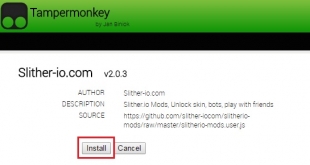
- For Greasemonkey: Greasemonkey will call you up to select Install button, just click it when you are asked so that you can confirm this installation on Firefox. Click Install


Step 4
- Go to slither.io or our page to play slither.io with mods.


